gdal vector concave-hull
Added in version 3.13.
Compute a concave hull around geometries of a vector dataset.
Synopsis
Usage: gdal vector concave-hull [OPTIONS] <INPUT> <OUTPUT>

Compute the concave hull of geometries of a vector dataset.

Positional arguments:
  -i, --input <INPUT>                                  Input vector datasets [required] [not available in pipelines]
  -o, --output <OUTPUT>                                Output vector dataset [required] [not available in pipelines]

Common Options:
  -h, --help                                           Display help message and exit
  --json-usage                                         Display usage as JSON document and exit
  --config <KEY>=<VALUE>                               Configuration option [may be repeated]
  -q, --quiet                                          Quiet mode (no progress bar or warning message) [not available in pipelines]

Options:
  -l, --layer, --input-layer <INPUT-LAYER>             Input layer name(s) [may be repeated] [not available in pipelines]
  -f, --of, --format, --output-format <OUTPUT-FORMAT>  Output format ("GDALG" allowed) [not available in pipelines]
  --co, --creation-option <KEY>=<VALUE>                Creation option [may be repeated] [not available in pipelines]
  --lco, --layer-creation-option <KEY>=<VALUE>         Layer creation option [may be repeated] [not available in pipelines]
  --overwrite                                          Whether overwriting existing output dataset is allowed [not available in pipelines]
  --update                                             Whether to open existing dataset in update mode [not available in pipelines]
  --overwrite-layer                                    Whether overwriting existing output layer is allowed [not available in pipelines]
  --append                                             Whether appending to existing layer is allowed [not available in pipelines]
                                                       Mutually exclusive with --upsert
  --output-layer <OUTPUT-LAYER>                        Output layer name [not available in pipelines]
  --skip-errors                                        Skip errors when writing features [not available in pipelines]
  --active-layer <ACTIVE-LAYER>                        Set active layer (if not specified, all)
  --active-geometry <ACTIVE-GEOMETRY>                  Geometry field name to which to restrict the processing (if not specified, all)
  --ratio <RATIO>                                      Ratio controlling the concavity [required]
  --allow-holes                                        Allow holes in the output polygon
  --tight                                              Whether the hull must follow the outer boundaries of the input polygons

Advanced Options:
  --if, --input-format <INPUT-FORMAT>                  Input formats [may be repeated] [not available in pipelines]
  --oo, --open-option <KEY>=<VALUE>                    Open options [may be repeated] [not available in pipelines]
  --output-oo, --output-open-option <KEY>=<VALUE>      Output open options [may be repeated] [not available in pipelines]
  --upsert                                             Upsert features (implies 'append') [not available in pipelines]
                                                       Mutually exclusive with --append
Description
gdal vector concave-hull computes the smallest concave polygon that
covers the input geometry. Generally the result will be a Polygon, but for
degenerate inputs it may be a LineString or a Point.
It uses the OGRGeometry::ConcaveHullOfPolygons() method for polygonal
input, and OGRGeometry::ConcaveHull() otherwise.
This command can also be used as a step of gdal vector pipeline.
GDALG output (on-the-fly / streamed dataset)
This program supports serializing the command line as a JSON file using the GDALG output format.
The resulting file can then be opened as a vector dataset using the
GDALG: GDAL Streamed Algorithm driver, and apply the specified pipeline in a on-the-fly /
streamed way.
Note
This command requires a GDAL build against the GEOS library.
Program-Specific Options
- --allow-holes
Allow result polygons to contain holes.
- --tight
Whether the hull must follow the outer boundaries of the input polygons.
- --ratio <RATIO>
Ratio controlling the concavity of the geometry.
A value of 1 produces the convex hull; decreasing values of the ratio generally produce polygons of increasing concavity (and with polygonal input, a value of 0 produces the original polygons).
Standard Options
Details
- --append
Whether appending features to existing layer(s) is allowed. This also creates the output dataset if it does not exist yet.
- --active-layer <ACTIVE-LAYER>
Set the active layer. When it is specified, only the layer specified by its name will be subject to the processing. Other layers will be not modified. If this option is not specified, all layers will be subject to the processing.
- --active-geometry <ACTIVE-GEOMETRY>
Set the active geometry field from its name. When it is specified, only the specified geometry field will be subject to the processing. Other geometry fields will be not modified. If this option is not specified, all geometry fields will be subject to the processing. This option can be combined together with
--active-layer.
- --co, --creation-option <NAME>=<VALUE>
Many formats have one or more optional dataset creation options that can be used to control particulars about the file created. For instance, the GeoPackage driver supports creation options to control the version.
May be repeated.
The dataset creation options available vary by format driver, and some simple formats have no creation options at all. A list of options supported for a format can be listed with the --formats command line option but the documentation for the format is the definitive source of information on driver creation options. See Vector drivers format specific documentation for legal creation options for each format.
Note that dataset creation options are different from layer creation options.
- --if, --input-format <format>
Format/driver name to be attempted to open the input file(s). It is generally not necessary to specify it, but it can be used to skip automatic driver detection, when it fails to select the appropriate driver. This option can be repeated several times to specify several candidate drivers. Note that it does not force those drivers to open the dataset. In particular, some drivers have requirements on file extensions.
May be repeated.
- --input-layer <INPUT-LAYER>
Specifies the name of one or more layers to process. By default, all layers will be processed. To read and write all layers but only process a subset, use
--active-layer.
- --lco, --layer-creation-option <NAME>=<VALUE>
Many formats have one or more optional layer creation options that can be used to control particulars about the layer created. For instance, the GeoPackage driver supports layer creation options to control the feature identifier or geometry column name, setting the identifier or description, etc.
May be repeated.
The layer creation options available vary by format driver, and some simple formats have no layer creation options at all. A list of options supported for a format can be listed with the --formats command line option but the documentation for the format is the definitive source of information on driver creation options. See Vector drivers format specific documentation for legal creation options for each format.
Note that layer creation options are different from dataset creation options.
- --oo, --open-option <NAME>=<VALUE>
Dataset open option (format specific).
May be repeated.
- -f, --of, --format, --output-format <OUTPUT-FORMAT>
Which output vector format to use. Allowed values may be given by
gdal --formats | grep vector | grep rw | sort
- --output-layer <NAME>
Specifies the name of the layer to which features will be written. If not specified, output layer names will be the same as input layer names.
- --output-open-option, --output-oo <NAME>=<VALUE>
Added in version 3.12.
Dataset open option for output dataset (format specific).
May be repeated.
- --overwrite
Allow program to overwrite existing target file or dataset. Otherwise, by default, gdal errors out if the target file or dataset already exists.
- --overwrite-layer
Whether overwriting the existing output vector layer is allowed.
- --skip-errors
Added in version 3.12.
Whether failures to write feature(s) should be ignored. Note that this option sets the size of the transaction unit to one feature at a time, which may cause severe slowdown when inserting into databases.
- --update
Whether to open an existing output dataset in update mode.
- --upsert
Added in version 3.12.
Variant of
--appendwhere theOGRLayer::UpsertFeature()operation is used to insert or update features instead of appending withOGRLayer::CreateFeature().This is currently implemented only in a few drivers: GPKG -- GeoPackage vector, Elasticsearch: Geographically Encoded Objects for Elasticsearch and MongoDBv3 (drivers that implement upsert expose the
GDAL_DCAP_UPSERTcapability).The upsert operation uses the FID of the input feature, when it is set (and the FID column name is not the empty string), as the key to update existing features. It is crucial to make sure that the FID in the source and target layers are consistent.
For the GPKG driver, it is also possible to upsert features whose FID is unset or non-significant (the
--unset-fidoption of gdal vector edit can be used to ignore the FID from the source feature), when there is a UNIQUE column that is not the integer primary key.
Examples
Example 1: Compute the concave hull of city locations in each country
Here the Natural Earth Populated Places dataset is used. To ensure that a polygonal hull is generated for each country, the input points are first buffered by a small amount. Otherwise, countries having only one or two cities would end up with a point or line geometry.
gdal vector pipeline ! \
    read ne_10m_populated_places.shp ! \
    buffer 0.1 ! \
    combine --group-by ADM0_A3 ! \
    concave-hull --ratio 0.5 ! \
    write country_city_hulls.gpkg
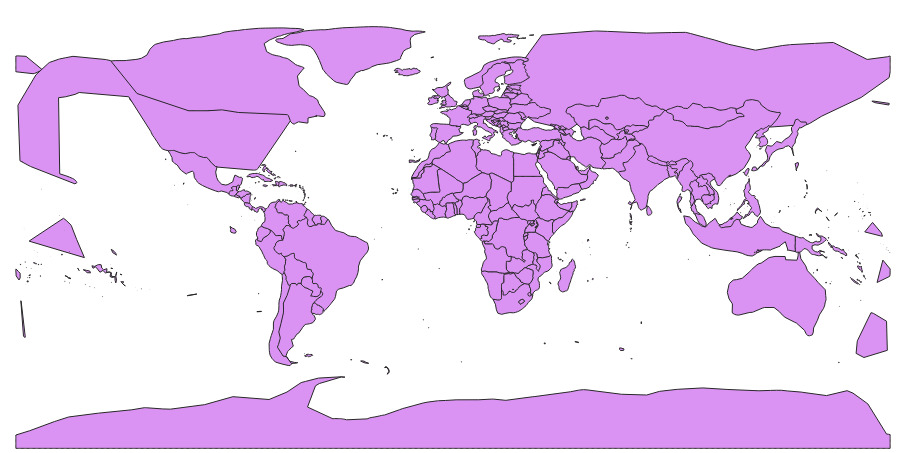
Example 2: Compute the concave hull of polygons of all countries, starting with their internal administrative divisions.
We use the "Admin 1 - States, Provinces" dataset, so that islands and oversea territories are in distinct polygonal features, to get a better looking result than if we started from "Admin 0 - Countries", where for example Bouvet Island in the South Atlantic is in the same multipolygon feature as mainland Norway.
The combine stage helps merging together administrative divisions of a same country with geographic proximity.
The dissolve stage transforms each geometry collection resulting from the previous stage into a valid polygon/multipolygon, as required by the concave hull by polygons algorithm.
The sql stage helps rendering smaller countries on top of larger ones.
gdal vector pipeline ! \
    read /vsizip//vsicurl/https://naciscdn.org/naturalearth/10m/cultural/ne_10m_admin_1_states_provinces.zip ! \
    combine --group-by admin,geonunit ! \
    dissolve ! \
    concave-hull --ratio 0.1 ! \
    rename-layer --output-layer countries_concave_hull_of_polygons ! \
    sql --sql "SELECT * FROM countries_concave_hull_of_polygons ORDER BY ST_Area(geometry) DESC" --dialect SQLite ! \
    write countries_concave_hull_of_polygons.gpkg